Don’t want to miss an update? Notifications & Reminders keep you informed about key events like NFO closing dates, completed payments, or pending actions.

1. Go to ‘Settings’ on your device. Search for ‘Rabbit Invest’. Make sure that all ‘notifications’ of the app are turned on

2. The ‘bell icon’ on the top right corner of the home page is where you can access all app notifications and reminders sent by your distributor
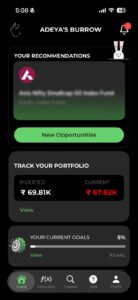
The 'bell icon' on the top right corner of the home page is where you can access all app notifications and reminders sent by your distributor

3. Upon clicking on the bell icon, you can see the list of notifications and reminders
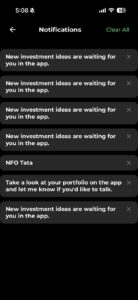
Upon clicking on the bell icon, you can see the list of notifications and reminders
Posts

How to get started with Rabbit Invest app?

BACK New to the Rabbit Invest App? This doc covers...

How to complete KYC using Rabbit Invest app?

BACK Completing KYC helps us verify your identity...

Create, Edit, and Manage Family with Rabbit Invest

BACK Create, Edit, and Manage Family with Rabbit...